
Waka TV Shop
Buy Waka TV Codes
Instant Delivery After Payment
🛡️Secure Payment · ⚡Automated Code Delivery · 🚀Zero Waiting
- Access for 30 days
- Supports 2 TVs + 2 Mobiles (Android only)
- Instant code delivery after payment
- Pay in local currency
Premium Monthly
(2TVs + 2Mobiles)
$14.99
/Month
- Access for 30 days
- Supports 1 TV + 1 Mobile (Android only)
- Instant code delivery after payment
- Pay in local currency
Standard Monthly
(1TV + 1Mobile)
$7.69
/Month
- Access for 365 days
- Supports 1 TV + 1 Mobile (Android only)
- Instant code delivery after payment
- Pay in local currency
Standard Yearly
(1TV + 1Mobile)
$76.99
/Year
Waka TV Payment & Code Activation Guide
Follow the steps below to complete your purchase and activate or renew your WAKA TV service:
- Follow the purchase instructions to complete your payment and receive your recharge code.
- Open the WAKA TV app on your Android TV or mobile phone.
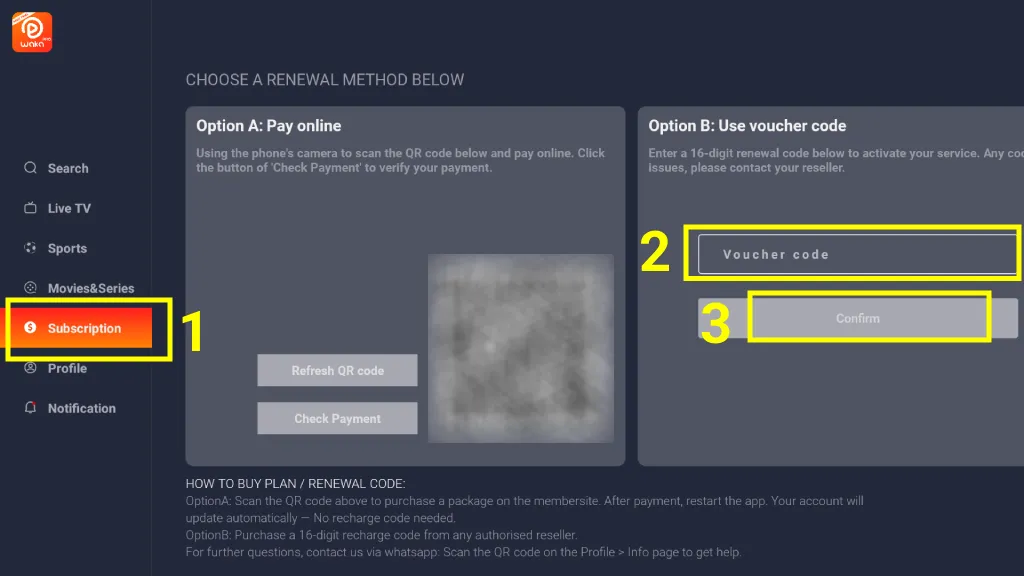
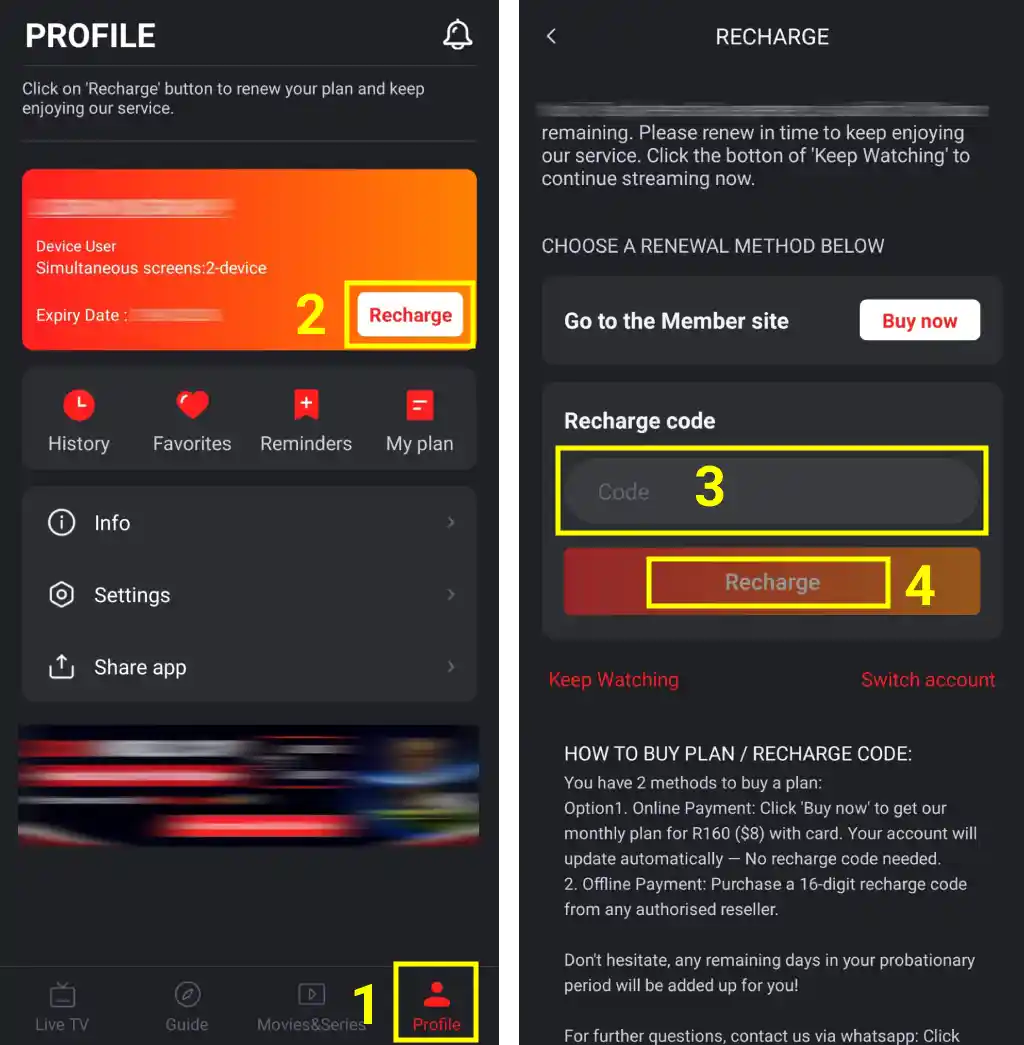
- Go to the Subscription section on TV devices, or Profile -> Recharge on mobile devices.
- Enter your Voucher Code (recharge code). On TV devices, focus on Confirm and press Enter. On mobile devices, tap Recharge to activate or renew your service.
TV
Open the Subscription section, enter your voucher code, focus on Confirm, and press Enter.
Mobile
Open Profile → Recharge, enter your recharge code, and tap Recharge.
Frequently Asked Questions – Waka TV Payment
💳 How does the WAKA TV code purchase process work?
1. Select your package
Click the “Buy Now” button on the package you want to purchase. You will be redirected to a secure checkout page.
2. Complete secure payment
Finish your payment using our secure Stripe checkout system.
3. Get your code instantly
After successful payment, you will be automatically redirected back to our website where your code will be displayed instantly. If it doesn’t appear immediately, click the “Refresh” button.
Your code will also be sent automatically to your payment email address.
Need it again? You may resend the code up to 3 times by WhatsApp and up to 3 times by email (including the automatic email).
💳 How can I pay for WAKA TV?
You can pay for your WAKA TV voucher online by selecting a package and completing the secure checkout process. We support fast and secure payment methods depending on your region. Once payment is successful, your recharge code will be generated instantly.
🌍 What payment methods are supported?
We support multiple online payment methods, including card payments and other secure checkout options depending on your country. All payments are processed securely to ensure fast delivery of your WAKA TV recharge code.
⚡ Is the WAKA TV code delivered instantly after payment?
Yes. After successful payment, your WAKA TV recharge code is shown immediately on the confirmation page. It is also automatically sent to your email and can be accessed anytime.
🎟 Where can I buy a WAKA TV voucher code?
You can buy a WAKA TV voucher code directly on our official website Waka TV Shop. Simply select your package, complete payment, and receive your code instantly after checkout.
🇿🇦 Can I buy WAKA TV voucher in South Africa?
Yes. Customers in South Africa can purchase WAKA TV vouchers online through our website. The process is fully digital and the code is delivered instantly after payment.
🔐 Is it safe to buy WAKA TV codes online?
Yes. All payments are processed through secure checkout systems. Your WAKA TV recharge code is delivered automatically after payment with no manual delay.
📦 What should I do if I don’t receive my code?
If your code does not appear after payment, you can refresh the page or check your email inbox. You may also use the resend option if available on the checkout result page.
🧾 Can I use the WAKA TV code immediately after purchase?
Yes. Once you receive your recharge code, you can immediately use it inside the WAKA TV app to activate or renew your subscription.
💰 What is a WAKA TV recharge code?
A WAKA TV recharge code (also called WAKA TV voucher code) is a digital code used to activate or renew your subscription. It is delivered instantly after payment.
🎟 How do I buy a WAKA TV voucher code?
You can buy a WAKA TV voucher code online by selecting a package, completing payment, and receiving your WAKA TV recharge code instantly after checkout.
⏰ When will I receive my WAKA TV activation code?
You will receive your WAKA TV recharge code / voucher code immediately after payment. The code is shown on the screen instantly after successful checkout, and it will also auto send to your payment email.
📋 How do I copy my WAKA TV voucher code?
After payment, your WAKA TV recharge code will appear on the page. You can click the voucher code once to copy it instantly, or send it to your WhatsApp or email for backup.
📱 How do I install WAKA TV?
To use your WAKA TV recharge code or voucher code, you need to install the WAKA TV app first.
You can follow our installation guide here:
👉 https://wakatvshop.com/waka-tv-installation-guide/
You can also visit the WAKA TV website to download the app:
👉 https://wakapro.com/
After installing the app, enter your recharge code or voucher code to activate your service.
🔑 How do I activate WAKA TV with a voucher code?
Open the WAKA TV app, go to your profile, then enter your WAKA TV recharge code / voucher code to activate your subscription instantly.
🔄 How do I recharge WAKA TV?
To recharge WAKA TV using your voucher code, follow these steps:
Open the WAKA TV app on your device.
Go to “Profile” and click “Recharge”.
Insert your WAKA TV recharge code or voucher code and click “Confirm” to activate.
📧 Can I receive my WAKA TV recharge code via WhatsApp or email?
Yes. After payment, your WAKA TV voucher code / recharge code will be displayed instantly and also sent to your email for safe storage and easy access.
You can also manually resend the code to your WhatsApp number or email whenever needed.
📦 What happens if I lose my WAKA TV voucher code?
If you do not clear your browser cache, you can still access your WAKA TV recharge code / voucher code from the same device. We also recommend saving it via WhatsApp or email after purchase.
Waka TV Shop
Instant recharge code delivery with secure payment.
Independent digital recharge service for existing WAKA TV users.
Operated by LAGEROLES LTD.
We are not affiliated with, endorsed by, or operated by WAKA TV.
Your WAKA TV recharge code will be automatically sent to this email after payment.